Time To Live (TTL)
TTL (Time To Live) automatically drops old partitions based on data age. Set a retention period, and QuestDB removes partitions that fall entirely outside that window - no cron jobs or manual cleanup required.
Requirements
TTL requires:
- A designated timestamp column
- Partitioning enabled
These are standard for time-series tables in QuestDB.
Setting TTL
At table creation
CREATE TABLE trades (
    ts TIMESTAMP,
    symbol SYMBOL,
    price DOUBLE
) TIMESTAMP(ts) PARTITION BY DAY TTL 7 DAYS;
On existing tables
ALTER TABLE trades SET TTL 7 DAYS;
Supported units: HOUR/H, DAY/D, WEEK/W, MONTH/M, YEAR/Y.
-- These are equivalent
ALTER TABLE trades SET TTL 2 WEEKS;
ALTER TABLE trades SET TTL 2w;
For full syntax, see ALTER TABLE SET TTL.
How TTL works
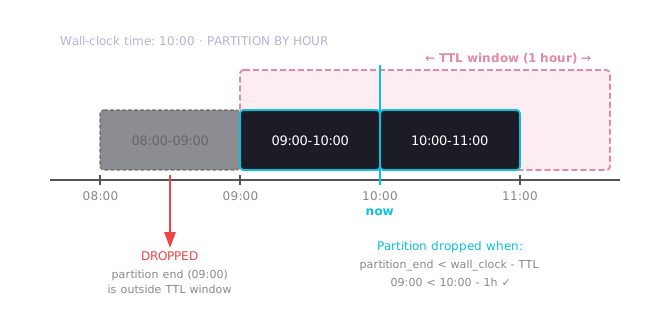
TTL drops partitions based on the partition's time range, not individual row timestamps. A partition is dropped only when its entire period falls outside the TTL window.
Key rule: A partition is dropped when partition_end_time < reference_time - TTL.
Reference time
By default, TTL uses wall-clock time as the reference, not the maximum timestamp in the table. This protects against accidental data loss if a row with a far-future timestamp is inserted (which would otherwise cause all existing data to appear "expired").
The reference time is: min(max_timestamp_in_table, wall_clock_time)
To restore legacy behavior (using only max timestamp), set in server.conf:
cairo.ttl.use.wall.clock=false
Disabling wall-clock protection means inserting a row with a future timestamp (e.g., year 2100) will immediately drop all partitions that fall outside the TTL window relative to that future time.
Example
Table partitioned by HOUR with TTL 1 HOUR:
| Wall-clock time | Action | Partitions remaining |
|---|---|---|
| 08:00 | Insert row at 08:00 | 08:00-09:00 |
| 09:00 | Insert row at 09:00 | 08:00-09:00, 09:00-10:00 |
| 09:59 | Insert row at 09:59 | 08:00-09:00, 09:00-10:00 |
| 10:00 | Insert row at 10:00 | 09:00-10:00, 10:00-11:00 |
The 08:00-09:00 partition survives until 10:00 because its end time (09:00)
must be more than 1 hour behind the reference time. At 10:00, the partition end
(09:00) is exactly 1 hour old, so it's dropped.
Checking TTL settings
SELECT table_name, ttlValue, ttlUnit FROM tables();
| table_name | ttlValue | ttlUnit |
|---|---|---|
| trades | 7 | DAY |
| metrics | 0 | null |
A ttlValue of 0 means TTL is not configured.
Removing TTL
To disable automatic retention and keep all data:
ALTER TABLE trades SET TTL 0;
Guidelines
| Data type | Typical TTL | Rationale |
|---|---|---|
| Real-time metrics | 1-7 days | High volume, recent data most valuable |
| Trading data | 30-90 days | Compliance requirements vary |
| Aggregated data | 1-2 years | Lower volume, longer analysis windows |
| Audit logs | Per compliance | Often legally mandated retention |
Tips:
- Match TTL to your longest typical query range plus a buffer
- TTL should be significantly larger than your partition interval
- For manual control instead of automatic TTL, see Data Retention